Batch Crop Product Images with AI
Ding Yu
Aqua Blue now has a smarter way to batch-crop product photos. You describe how the images should be cropped in plain language:
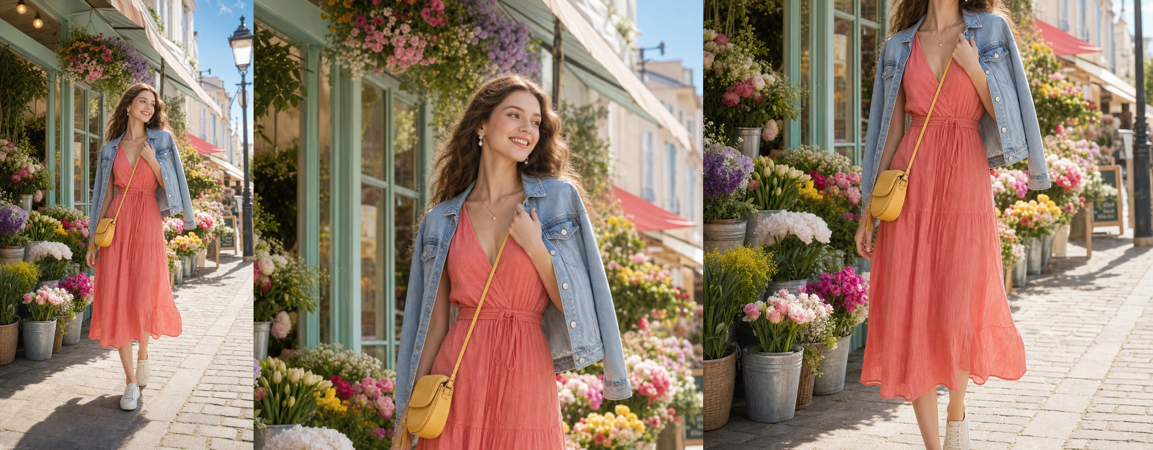
Left to right: original photo, upper-body close-up, head cropped out to emphasize the outfit.
For online stores, product operators often spend time cropping model photos one by one before a product can go live. With this workflow, you can hand that repeated work to an AI employee. For example:
I usually upload a batch of model photos. Please crop each image into a square photo suitable for product listings, then package the finished images into a ZIP for download. Requirements: Only crop and resize proportionally when needed. Do not retouch, extend backgrounds, change colors, or remove objects. Use the largest square crop possible because I do not want white borders or generated padding. Always keep the model's full face. Keep the clothing complete as much as possible, especially details such as the neckline, straps, lace, sleeves, cuffs, hem, garment body, and overall silhouette. If the original image is vertical and the full model plus outfit cannot fit into a square, prioritize the face, hair, and main clothing details. Crop away background, furniture, floor, legs, or other areas that do not affect product display. For vertical images, choose a slightly lower crop when possible so more of the clothing body and hem remain, as long as the face and hair are not too close to the edge. Keep the original filename where possible. Return a ZIP containing all finished product images.
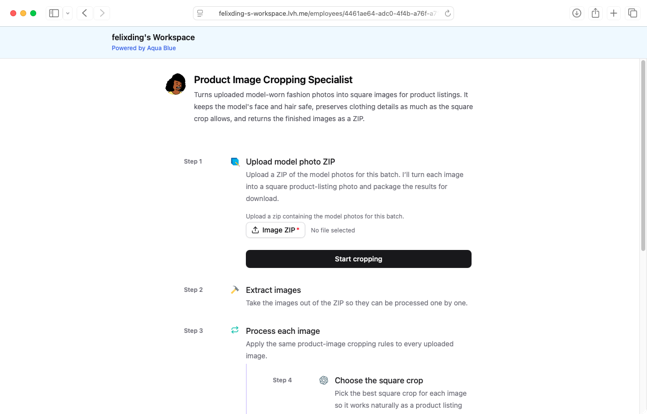
The AI employee creates a work plan, and then you upload the original images:
For sellers who publish dozens of new items every day, this can save hours of manual image work. You can apply for a free trial here.