Every Seller Running Creator Campaigns Ends Up with a Monster Spreadsheet
Ding Yu
For the past two months, I have been digging through seller discussions in Reddit communities such as Shopify, ecommerce, TikTok Shop, and eBay. I have also been reading Xiaohongshu posts and talking directly with merchants who work with creators.
The same pattern keeps showing up: sooner or later, nearly every seller builds a spreadsheet that turns into a monster.
It might live in Google Sheets, Excel, or Lark. It starts with a few creator names and quickly grows to include products, sample orders, tracking numbers, posting commitments, content links, sales, commissions, and follow-ups. Then someone has to keep it current every day.
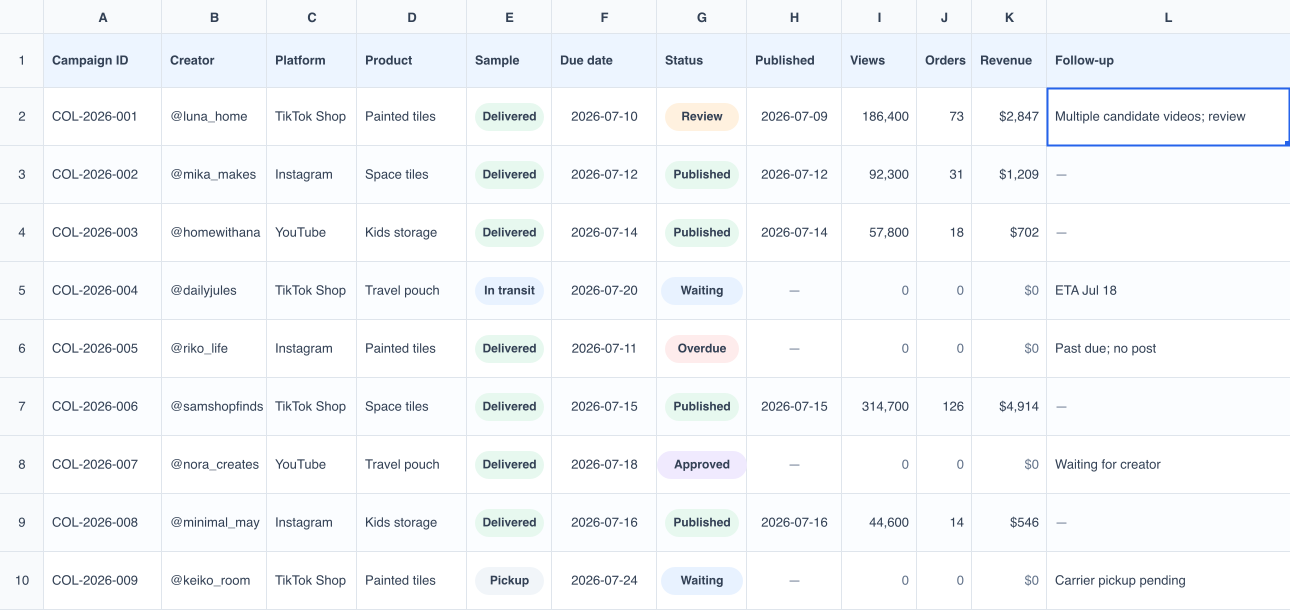
Figure: A typical creator campaign tracker combines orders, logistics, content, and sales data.
A creator campaign is scattered across several systems
The store might run on Shopify, Etsy, or eBay, while the creators are publishing on YouTube, TikTok, Instagram, Threads, and Facebook.
No single platform can see the whole campaign. The storefront knows about orders, but not whether a creator posted the promised video. The social platform knows about the content, but not necessarily which store order it influenced. Even something as basic as confirming that a sample arrived may require checking a carrier page, an inbox, or a direct message.

Figure: Data from storefronts and social platforms converges in the seller’s tracker.
So the spreadsheet becomes the one place where the seller tries to assemble the full story. Typical columns include:
- Creator handles and channels
- Outreach and reply status
- Sample orders, tracking, and delivery
- Agreed content and due dates
- Live post or video links
- Views, clicks, orders, and revenue
- Commission and the next follow-up
At that point, it is no longer just a reporting sheet. It is a small back-office system, held together by people copying information between tabs and websites.
TikTok Shop should be the exception
TikTok Shop owns both sides of the transaction: creators publish the content, and shoppers place the order on the same platform. In theory, it should be able to connect promotion and sales without a separate tracking system.
In practice, sellers still run into missing or incorrect matches. One large seller I spoke with has staff watch every relevant video each day because TikTok Shop’s attribution is not accurate enough for their workflow.
Having the data under one roof helps, but it does not automatically make the result dependable.
Why dedicated software rarely replaces the spreadsheet
Every seller develops a slightly different operating process.
Some send a sample before discussing content. Others approve a brief first. Some manage the work creator by creator; others organize everything around a product launch. One team cares most about posting deadlines, while another needs to compare sample cost, commission, and attributed revenue.
Most creator-management tools come with a workflow already built in. That works when the seller happens to operate the same way. When it does not, the team either changes its process to fit the software or goes back to the spreadsheet.
The spreadsheet wins because it can bend around the business.
Keep the spreadsheet; stop using people as the sync engine
The useful question is not, “How do we get rid of the spreadsheet?”
It is, “How do we keep the flexible system the team already understands without spending hours maintaining it?”
That is the problem I am working on now.
I have been helping sellers connect their existing spreadsheets with the platforms they already use. The system can update sample orders, creator records, fulfillment status, and campaign results automatically. If it finds something it cannot confirm safely, it hands that item to a person instead of guessing.
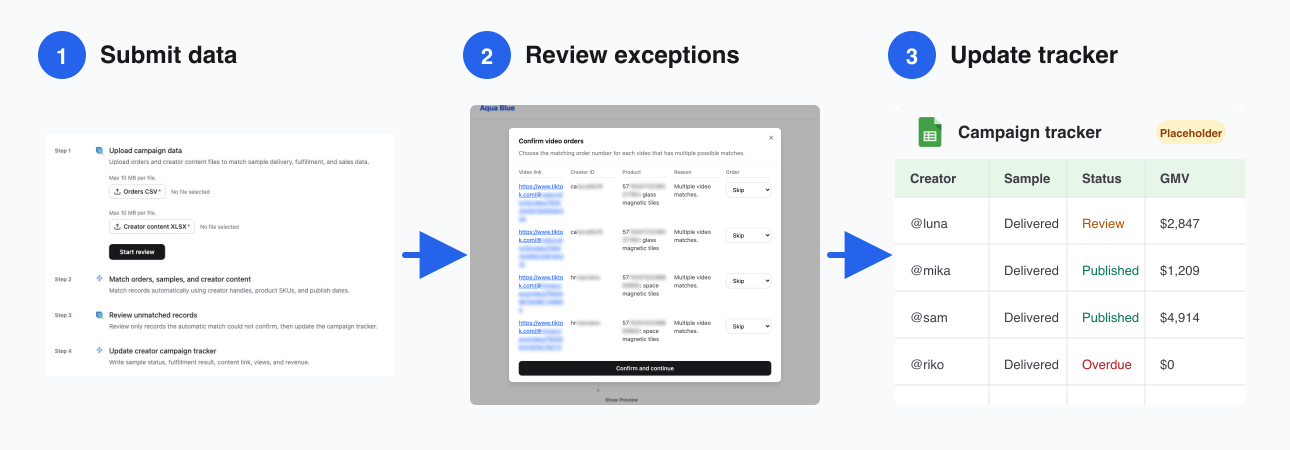
Figure: Submit data, review exceptions, and update the tracker. The final Google Sheets view is a placeholder.
My approach has two rules:
- Do not force the seller to adopt a new operating process. Automate the repetitive work around the process they already have.
- Use AI where interpretation is useful, but keep the actual execution deterministic, repeatable, and reviewable. Anyone who has watched an AI tool confidently do the wrong thing will know why this matters.
Disclosure: this is what I am building at Aqua Blue. The spreadsheet can stay, and the seller’s process can stay. The software takes over the copying, checking, and updating that currently consumes the team’s day.
If your team is maintaining one of these spreadsheets
If you are manually checking whether creators posted, whether samples arrived, and whether campaign data has been updated, I am happy to review the process with you for free and tell you what can realistically be automated.
For TikTok Shop sellers in the US, I can also build the automation at no cost and include one year of access. Aqua Blue is applying for official TikTok Shop developer access, so we are looking for real merchant cases with active operations and GMV.
You can email me directly if you would like to talk.